
 Black Friday


Sign up to receive week deals
When is the best time to buy at Amazon?
The number of active promo codes by month
How to use a coupon code on Amazon?
-
Choose your item
To display all the categories available on the site, find the "All" button, which is located in the upper left part of the site page. Click on it, and you will see all the categories and subcategories of the site, select the desired category and click on it.
-
Learn the characteristics of a product
When you find the item, click on it. On the next page, view details of your item, and the materials used to make it, you can roll over the image to see the other sides of it.
-
Add to cart
Pick a size, decide the quantity, and select a shipping address or you can add it to the list for later. Click on "Add to cart".
-
Write your data for delivery
Fill in your shipping details and delivery options, then click on "Continue".
-
Apply a coupon code
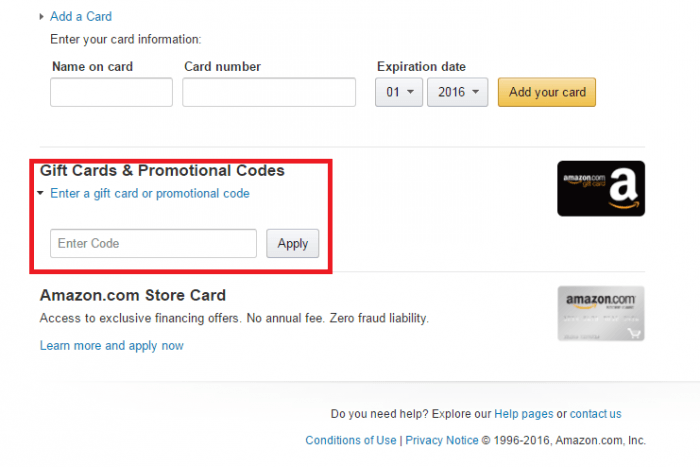
On the next page, decide your payment method and fill in the required field. After this click on "Gift cards / Promotional code". Type your code into the field and click on "Apply". Click on "Continue" to finish your order.

















Why You Can Trust Our Deals
At DiscountReactor, we combine smart AI tools and careful editorial work to show you only accurate "up-to-date" and truly useful offers. AI helps us quickly filter and pre-test coupons, while editors manually check the results, adjust the reliability rating based on confirmed validity and keep the pages clean without unnecessary “noise.”We monitor stores daily, conduct regular manual content reviews, update or remove any problematic coupons within 24 hours on business days. We clearly mark coupons as "Verified", "Expired" or "Editor's Choice" work with partner stores on content accuracy, and always put your interests first by showing only fresh and working offers without unnecessary clutter. Rankings are based on popularity, coupon validity and user interest.
New Amazon Coupon Codes November 2026
We may earn commission if you are using links, coupon codes and deals, provided by our team.
 Reviewed by
Andrew Priobrazhenskyi
Editor & Deals Expert View codes again


